How to Request a Refund of Uncredited Deposit
[Estimated Reading Time: 3 minutes]
Nagbibigay ang gabay na ito ng sunod-sunod na paliwanag para sa pag-retrieve ng mga deposit na ginawa gamit ang mga unlisted coin o sa pamamagitan ng mga unsupported network sa Bitget. Utilizing the Self-Service Refund feature ensures a secure and efficient recovery process.
How to request a refund of uncredited deposit
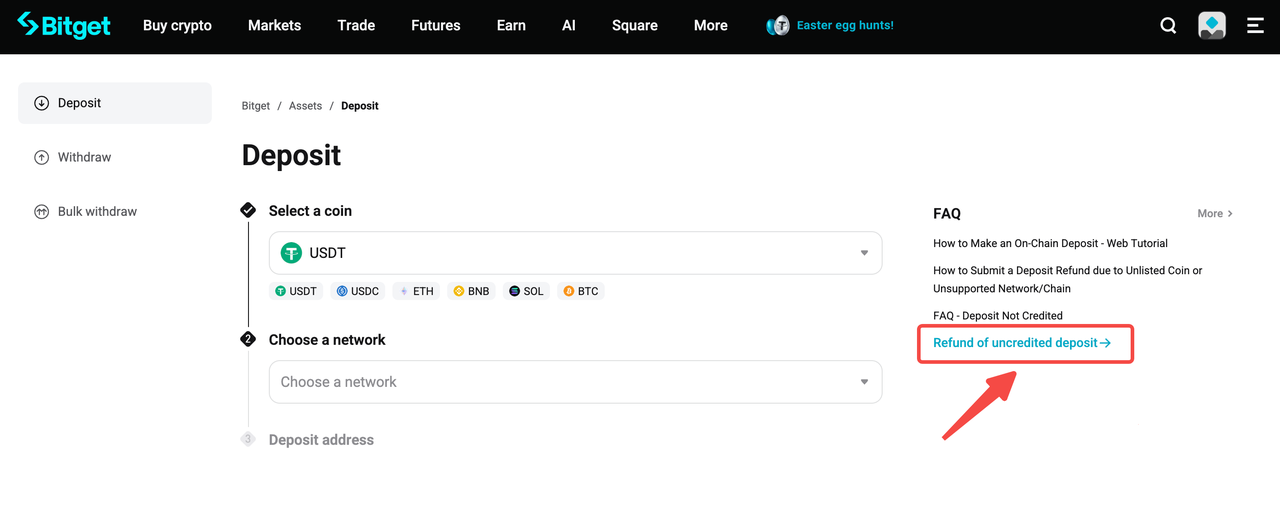
Step 1: Access the Self-Service Refund page
1. Log in to your Bitget account on the Bitget website.
2. Click on your profile icon in the upper-right corner and choose Deposit.
3. Click [Refund of uncredited deposit] located at the right side of the page.
Step 2: Select the Issue Type
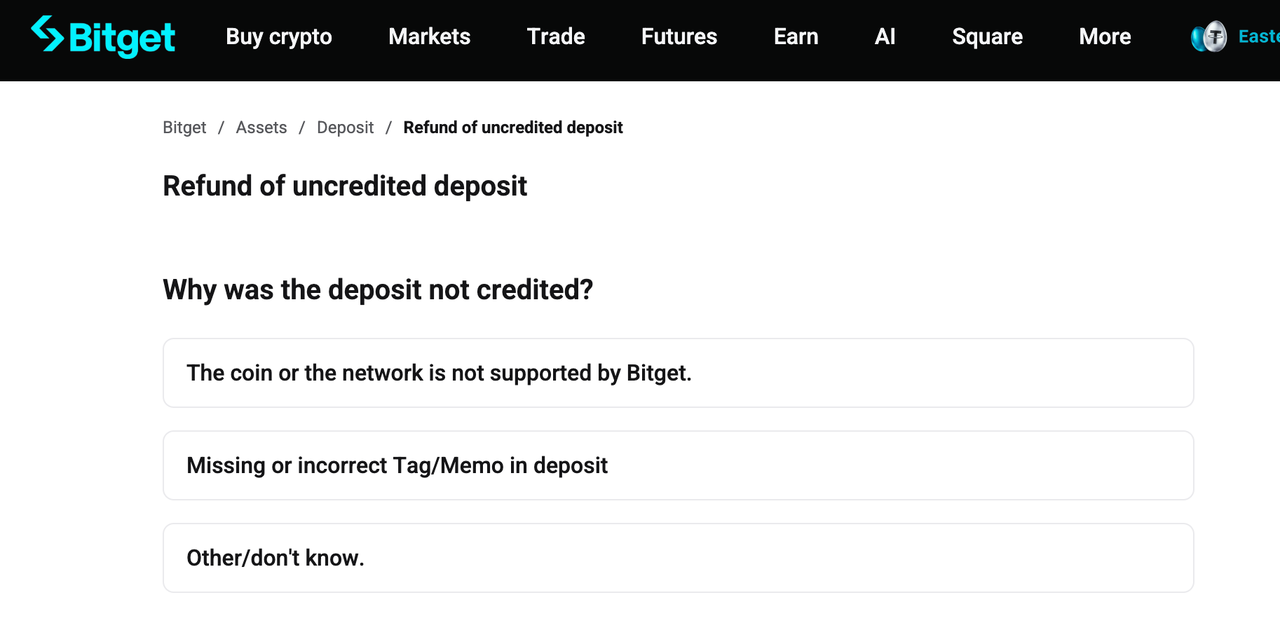
1. Choose the issue type and click Apply to proceed, unless you have another specific reason or are unsure about the exact issue, choose [other/don't know].
Step 3: Complete the Refund Form
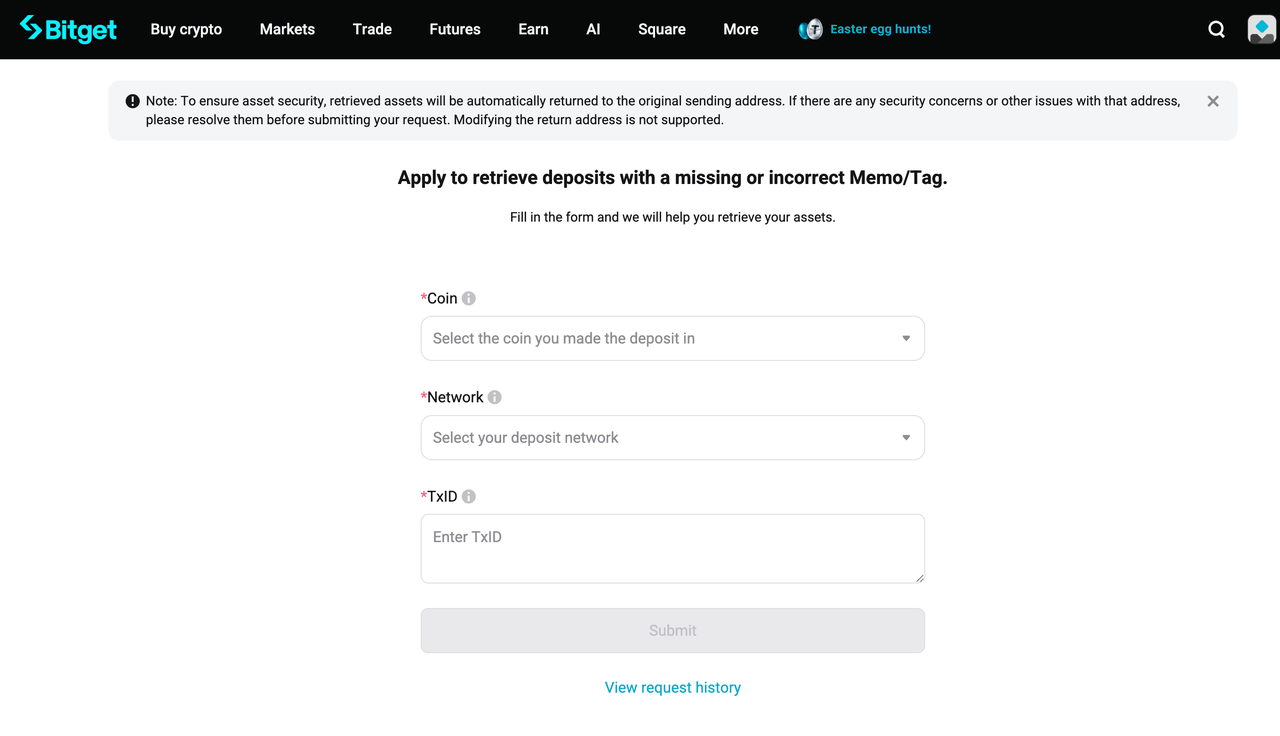
Issue 1 - The coin or the network is not supported by Bitget.
Kung ang coin na sinusubukan mong i-deposito ay hindi nakalista sa Bitget o na-delist na, o ang network na pinili mo ay hindi suportado ng Bitget, hindi maki-credit ang deposit.
1. Network - When depositing into Bitget, please make sure to fill in the transaction information based on the deposit network you selected. Kung hindi mo makumpirma ang network kung saan isinagawa ang deposito, mangyaring makipag-ugnayan sa platform ng pag-withdraw.
2. Token contract address - You can find it by entering your TxID (transaction hash) into a block explorer (such as Etherscan), and then clicking the token name to view its contract address. Note: The contract address is not the same as the deposit address. Please double-check before submitting. Click here for a step-by-step guide on how to find a token's contract address.
3. Withdrawal address - The address that you made the withdrawal. Make sure the address is correct, as we will return the assets to the on-chain address.
4. TxID - The transaction ID (TxID) is a unique identifier for each blockchain transaction. You can find the TxID in your withdrawal history. Kung hindi mo mahanap ang TxID, makipag-ugnayan sa withdrawal platform para sa assistance. Make sure that the TxID matches the block transaction information. Do not fill in information other than the TxID/TxHash (such as the deposit/withdrawal addresses, account details, email, etc.)
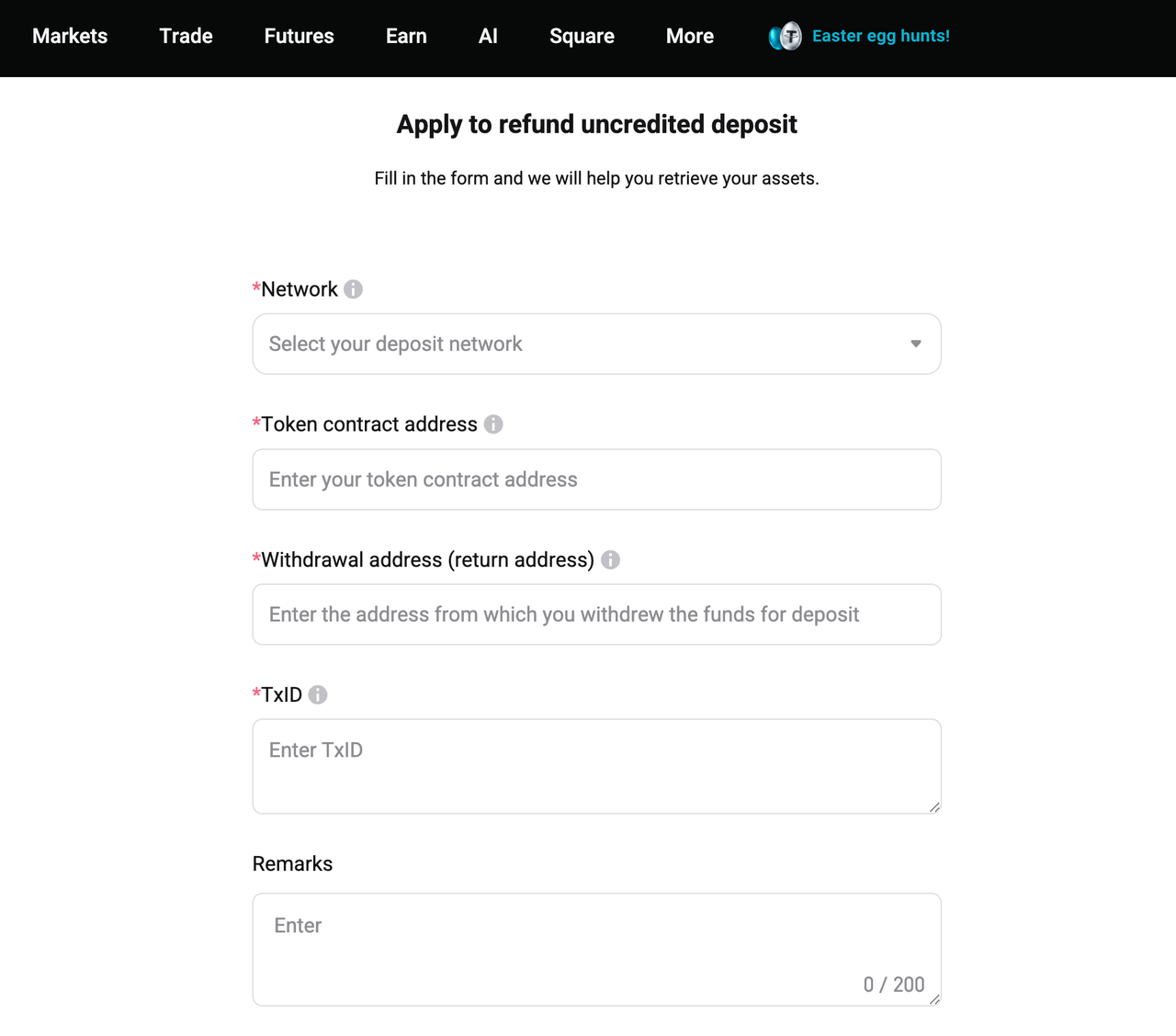
Issue 2 - Missing or incorrect Tag/Memo in deposit
Certain networks (such as EOS) require a Memo for deposits. If the address or memo is incorrect or missing, your deposit may fail to arrive.
1. Coin - Select the token you deposited to Bitget and enter all details that align with your transaction records. If you're unsure, confirm with the platform you used for the withdrawal.
2. Network - When depositing into Bitget, please make sure to fill in the transaction information based on the deposit network you selected. Kung hindi mo makumpirma ang network kung saan isinagawa ang deposito, mangyaring makipag-ugnayan sa platform ng pag-withdraw.
3. TxID - The transaction ID (TxID) is a unique identifier for each blockchain transaction. You can find the TxID in your withdrawal history. Kung hindi mo mahanap ang TxID, makipag-ugnayan sa withdrawal platform para sa assistance. Make sure that the TxID matches the block transaction information. Do not fill in information other than the TxID/TxHash (such as the deposit/withdrawal addresses, account details, email, etc.)
Issue 3 - Other/don't know
1. In progress/failed
Kung ang deposit order ay kasalukuyan pang pinoproseso o nabigo, mangyaring maghintay ng karagdagang update o makipag-ugnayan sa payment platform para sa suporta. Hindi pa natatanggap ng Bitget ang pondo at hindi na siya makakatulong pa sa iyo.
2. Completed (funds have been transferred out)
If the deposit has been completed on the payment platform, the reasons for crediting failure could be:
• The memo/tag was incorrect or empty.
• The withdrawal from Bitget to another exchange failed, resulting in the funds being returned to Bitget.
• Other unknown reasons.
Mangyaring makipag-ugnayan sa aming customer support team at ibigay ang kaugnay na patunay ng transaksyon upang matulungan ka namin sa pag-retrieve ng iyong mga asset.
Important to Know
• Eligibility: Not all deposits are eligible for refunds. Bitget strives to assist users but cannot guarantee recovery in all cases.
• Processing Time: Applications may take up to 10 working days to process, depending on the case's complexity and provided information's accuracy.
• Accuracy: Providing precise information accelerates the refund process.
FAQs
1. What happens if I deposit using the wrong network?
Kung magdeposito ka ng pondo gamit ang mali o hindi sinusuportahang network, maaaring hindi ma-kredito ang deposito sa iyong Bitget account. Maaari kang magsumite ng kahilingan para sa Self-Service Refund para sa pagsusuri. Ang pagbawi ay nakadepende sa network na ginamit, uri ng asset, at kung maaaring makuha ang mga pondo.
2. How can I find the token contract address for my application?
You can search your TxID on a blockchain explorer, then open the token details to locate the contract address. Siguraduhing hindi mo ito mapagkamalan sa iyong deposit address.
3. What happens if I entered the wrong Memo or Tag?
Ang ilang blockchain network ay nangangailangan ng Memo o Tag. Kung ito ay nawawala o naipasok nang mali, maaaring hindi awtomatikong dumating ang deposito at maaaring kailanganin itong manu-manong suriin.
4. How long does a refund application usually take?
Ang pagproseso ay maaaring tumagal nang hanggang 10 working days, depende sa kasalimuotan ng kaso at kung kumpleto at tumpak ang isinumiteng impormasyon.