How to Perform Spot Trading on Bitget — Website Guide
[Estimated reading time: 3 mins]
This article provides a step-by-step guide to spot trading on the Bitget website. Spot trading lets you buy or sell cryptocurrencies at current market prices.
What is spot trading?
Spot trading is the direct purchase or sale of cryptocurrencies using available funds. It allows traders to buy or sell assets such as Bitcoin or Ethereum at current market prices. On Bitget, spot trading offers competitive fees, a user-friendly interface, and access to a wide range of trading pairs, making it suitable for both beginners and experienced traders.
How to make spot trades on the Bitget website
Step 1: Go to the spot trading section
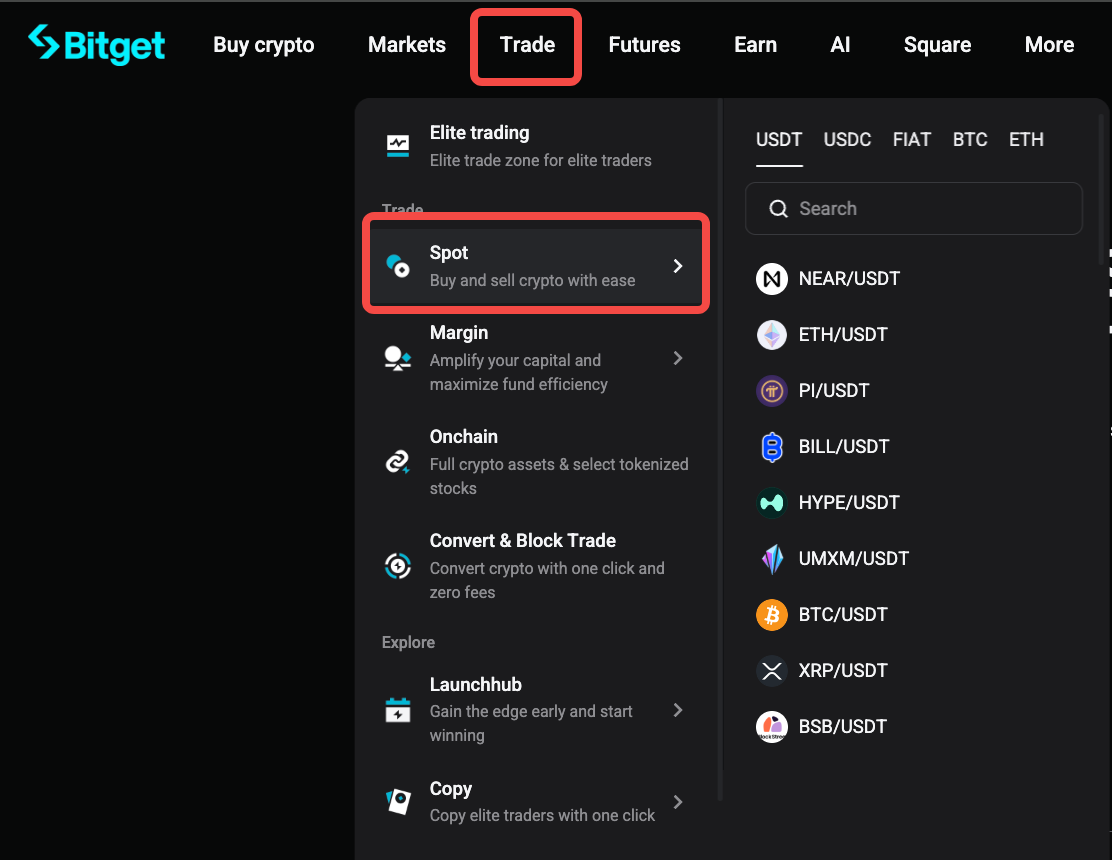
1. Click Trade in the top navigation bar.
2. Select Spot Trading from the dropdown menu.
Step 2: Choose a trading pair
1. On the trading interface, locate the search bar in the top-left corner.
2. Enter the cryptocurrency pair you want to trade (e.g., BTC/USDT), then select it from the list.

Step 3: Select an order type and place your order
You can choose between a Market order or a Limit order based on how you want your trade to be executed.
Option 1: Place a market order
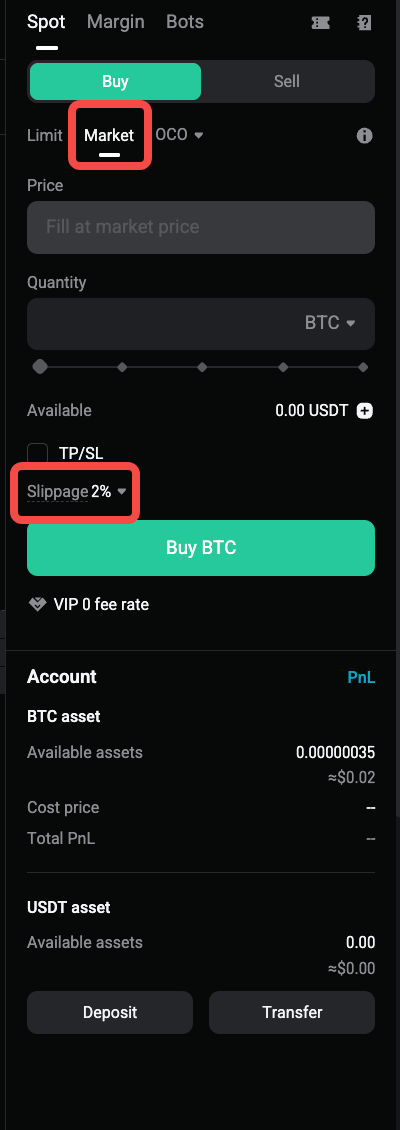
A market order is executed immediately at the best available market price. Because prices can change rapidly, the final execution price may differ from the displayed price before the order is placed.
Bitget supports slippage tolerance and slippage warnings for regular market orders.
1. Select Market as the order type.
2. Enter the amount you want to buy or sell.
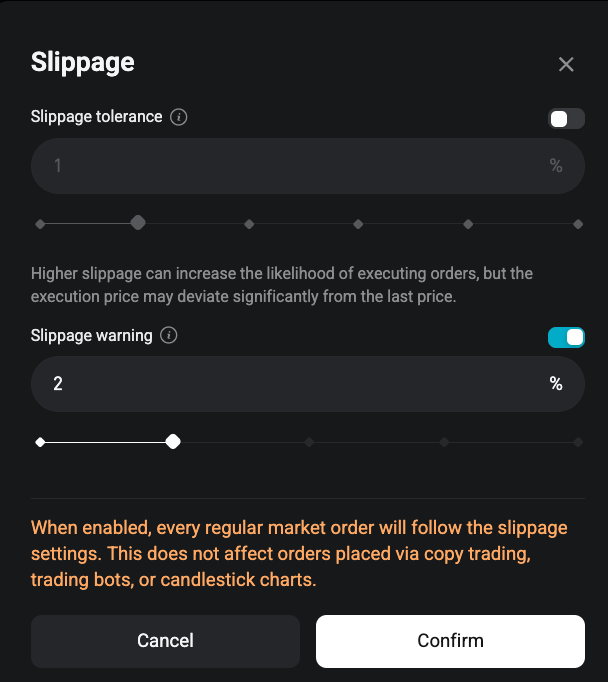
3. Choose whether to set slippage tolerance.
-
After you configure slippage tolerance, the system will place a limit on the execution price of your market order.
-
Any unfilled portion of the order that exceeds the slippage tolerance will be automatically canceled.
-
Due to rapid market fluctuations, the final execution price may still deviate from your configured setting.
4. Choose whether to enable slippage warning.
-
-
After slippage warning is enabled, the system will check market conditions each time you place a market order.
-
If the estimated slippage exceeds your tolerance value, you will receive an alert before continuing with the order.
-
5. Click Buy or Sell to place the order.
Note: Once enabled, the slippage settings will apply to all regular market orders. These settings do not affect orders placed through copy trading, trading bots, or candlestick charts.
Example: To buy 100 USDT worth of BTC, select Market, enter 100 USDT in the Total field, review your slippage settings, and click Buy BTC.
Option 2: Place a limit order
A limit order allows you to set the price at which you want to buy or sell. The order will only execute when the market reaches your specified price.
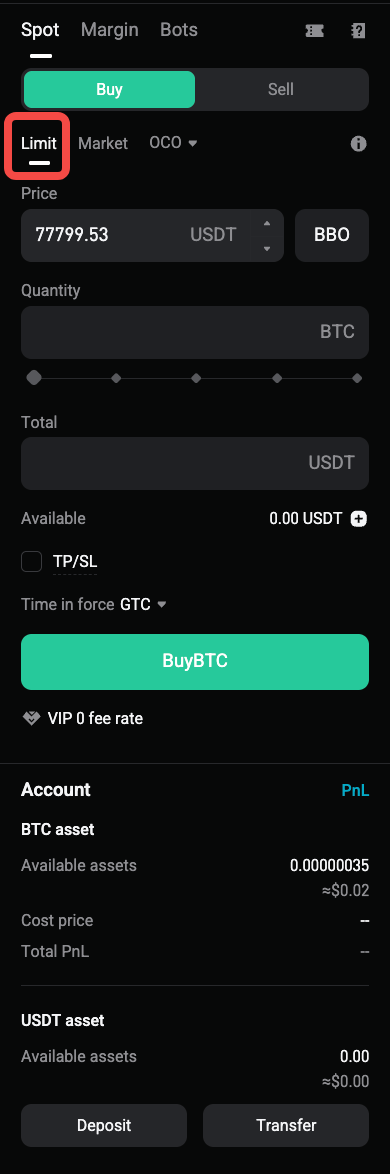
1. Select Limit as the order type.
2. Enter your preferred price.
3. Enter the quantity you want to buy or sell.
4. Click Buy or Sell to place the order.
5. Monitor your order under Open Orders until it is filled or canceled.
Example: To buy 1 BTC at 85,000 USDT, set the price to 85,000 USDT and the quantity to 1 BTC.

6.
Step 4: Check your order history
After placing an order, you can track its status and view past transactions:
1. Go to Open Orders to see active or unfulfilled orders.
2. Select Order History to review completed or canceled trades.
Tips for spot trading on Bitget
-
Market orders: Suitable for quick trades, but execution prices may vary slightly due to market volatility.
-
Limit orders: Useful for setting strategic entry or exit prices without continuously monitoring the market.
-
Manage risk: Avoid trading with funds you cannot afford to lose.
-
Stay updated: Monitor market trends and news to make more informed trading decisions.
FAQ
1. What is the difference between a market order and a limit order?
A market order is executed immediately at the best available market price. A limit order allows you to set your own price and will only execute when the market reaches that price.
2. What is slippage tolerance for market orders?
Slippage tolerance sets a limit on the execution price of a market order. Any unfilled portion of the order that exceeds the slippage tolerance will be automatically canceled.
3. Why may the final execution price differ from my slippage tolerance setting?
Market prices can change rapidly after you place an order. Due to market volatility, the final execution price may still deviate from your configured setting.
4. What is slippage warning?
Slippage warning checks market conditions each time you place a market order. If the estimated slippage exceeds your tolerance value, the system will alert you before you continue.
5. Do slippage settings apply to all order types?
Slippage settings apply only to regular market orders once enabled. They do not affect orders placed through copy trading, trading bots, or candlestick charts.
6. Why was part of my market order canceled?
Part of your market order may be canceled if the execution price exceeds your slippage tolerance. The system will only fill the portion that remains within the allowed range.
7. Can I cancel a pending limit order?
Yes. You can cancel a pending limit order from Open Orders before it is fully executed.
8. What fees apply to spot trading?
Spot transaction fees may vary depending on your account level and trading pair. Refer to the Bitget fee schedule for the latest rates.
Disclaimer and Risk Warning
All trading tutorials provided by Bitget are for educational purposes only and should not be considered financial advice. The strategies and examples shared are for illustrative purposes and may not reflect actual market conditions. Cryptocurrency trading involves significant risks, including the potential loss of your funds. Past performance does not guarantee future results. Always conduct thorough research and understand the risks involved. Bitget is not responsible for any trading decisions made by users.
Join Bitget, the World's Leading Crypto Exchange and Web3 Company