Spot Trend-Following Bot on Bitget – Mobile App Guide
[Estimated Reading Time: 4 mins]
This guide explains how to use the spot trend-following bot on the Bitget mobile app. It covers everything from selecting indicators and trading pairs to configuring settings and activating your bot. Learn how to optimize your spot trading strategy with ease.
What is a spot trend-following bot?
The spot trend-following bot is an automated trading tool that uses technical indicators to execute spot trades based on market trends. By leveraging indicators such as MACD, BOLL, MA, and RSI, the bot simplifies strategy execution across different market conditions, including trending and ranging markets.
Key benefits:
-
Customizable strategies: Choose from multiple indicators to suit trending or ranging markets.
-
Risk management tools: Configure take-profit and stop-loss settings to manage gains and losses.
-
Time-saving automation: Trades are executed automatically, reducing the need for constant monitoring.
Indicator strategies overview
The spot trend-following bot supports the following indicator strategies:
1. MACD (Moving Average Convergence Divergence)
-
Suitable for trending markets.
-
Tracks momentum and trend direction, taking profit when reversals occur.
2. BOLL (Bollinger Bands)
-
Suitable for ranging markets.
-
Identifies relative highs and lows, executing trades based on mean reversion.
3. MA (Moving averages)
-
Suitable for trending markets.
-
Tracks short- and long-term trends, taking profit when momentum weakens.
4. RSI (Relative Strength Index)
-
Suitable for ranging markets.
-
Identifies overbought and oversold conditions, closing trades when price normalizes.
How to use the spot trend-following bot?
Step 1: Go to the trading section
1. From the bottom navigation bar, tap Trade.
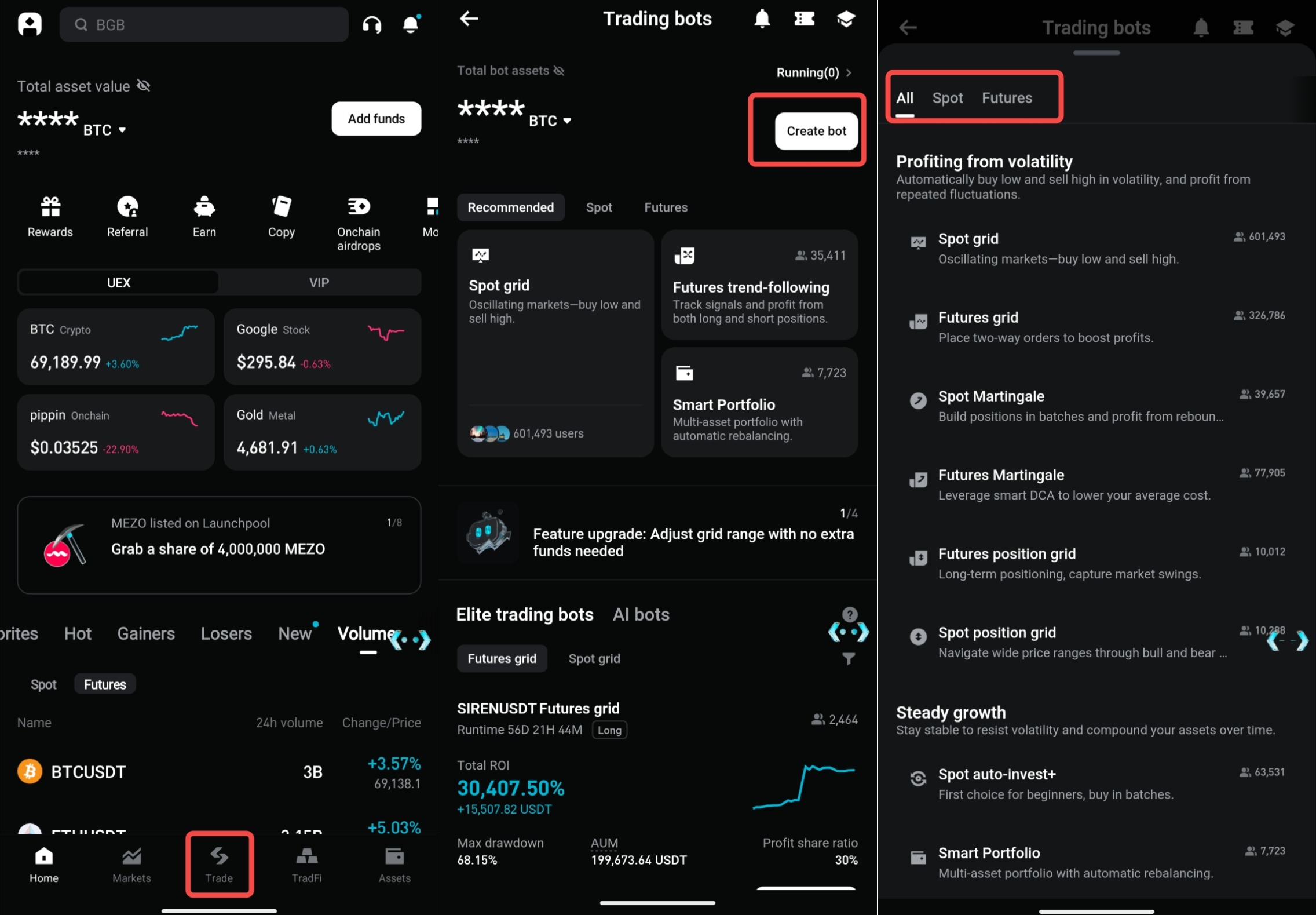
2. At the top of the screen, tap Bots.
Step 2: Open the bot trading menu
1. Tap Create bot from the top of the Bots section.
2. Browse the available bot strategies and select Spot Trend-following Bot.
Step 3: Choose an indicator and trading pair
1. Choose your preferred trading pair (e.g., BTC/USDT) from the menu.
2. Choose an indicator: MACD, BOLL, MA, or RSI.
3. Select a bot aligned with your indicator and trading pair.
4. Tap Use to proceed to the bot setup page.
Step 4: Set investment amount
1. Enter the total USDT amount to allocate. The minimum amount is displayed on the screen (e.g., ≥2 USDT).
2. Ensure sufficient available balance.
Step 5: Adjust advanced settings
1. Take-profit (%):
-
Set the percentage gain at which the bot will automatically sell to lock in profits (e.g., 5%).
2. Stop-loss (%):
-
Set the percentage at which the bot closes trades to limit losses (e.g., 3%).
3. Sell all at termination:
-
Enable this option to sell all holdings and convert them into USDT when the bot is stopped.
Step 6: Launch the bot
1. Review all settings, including the indicator, take-profit, stop-loss, and allocation amount.
2. Confirm your balance meets the requirements.
3. Tap Create Order to activate the spot trend-following bot.
FAQ
1. What is the minimum amount required to start the bot?
The minimum amount is shown in the Investment section and is typically ≥2 USDT.
2. Can I switch the indicator type after starting the bot?
No. To change the indicator type, you must stop the current bot and create a new one.
3. How do I select the best indicator for current market conditions?
Use MACD or MA for trending markets and BOLL or RSI for ranging markets.
4. Does the spot trend-following bot guarantee profits?
No. While the bot is based on historical data and technical indicators, market conditions can vary.
5. What happens if I stop the bot?
If Sell all at termination is enabled, all holdings will be sold and converted to USDT.
Disclaimer and Risk Warning
All trading tutorials provided by Bitget are for educational purposes only and should not be considered financial advice. The strategies and examples shared are for illustrative purposes and may not reflect actual market conditions. Cryptocurrency trading involves significant risks, including the potential loss of your funds. Past performance does not guarantee future results. Always conduct thorough research and understand the risks involved. Bitget is not responsible for any trading decisions made by users.
Join Bitget, the World's Leading Crypto Exchange and Web3 Company
Share