How to Trade with Bitget Stock+?
[Estimated reading time: 5 minutes]
Why trade with Bitget Stock+
1. Full brokerage experience:
User-friendly interface: Designed to match the look and feel of mainstream brokers — zero learning curve when switching.
• Stock transfer support: Transfer your stocks from other brokers to Bitget and enjoy transfer bonuses during the promotion period.
• 24/5 trading: Trade U.S. stocks during pre-market, regular hours, after-hours, and overnight sessions.
• Free real-time market data: Get free Level 1 real-time quotes the moment you open an account. Eligible VIP users can access Level 2 Nasdaq TotalView and other millisecond-level market data for free — saving up to $248 per year.
• Fractional shares with no minimum investment: Start investing from as little as 0.0001 shares with no minimum investment required. Diversify your portfolio with ease.
• Market insights: Stay informed with the latest news, earnings reports, and analysis on trending stocks to support your investment decisions.
2. Easy deposits withdrawals: The platform supports both fiat and crypto deposits and withdrawals — seamlessly within a single app. Withdraw instantly after T+1 settlement, no waiting required.
3. Low fees: Starting from 0.1%, with fees as low as 50% off during the promotion period.
4. New user rewards: Complete tasks like opening an account, making a deposit, and placing a trade to share a pool of exciting rewards.
How to trade with Bitget Stock+
This guide walks you through the entire process — from opening an account to buying and selling. It's simple: Just follow the steps to start investing in real U.S. stocks.
Step 1: Access Bitget Stock+
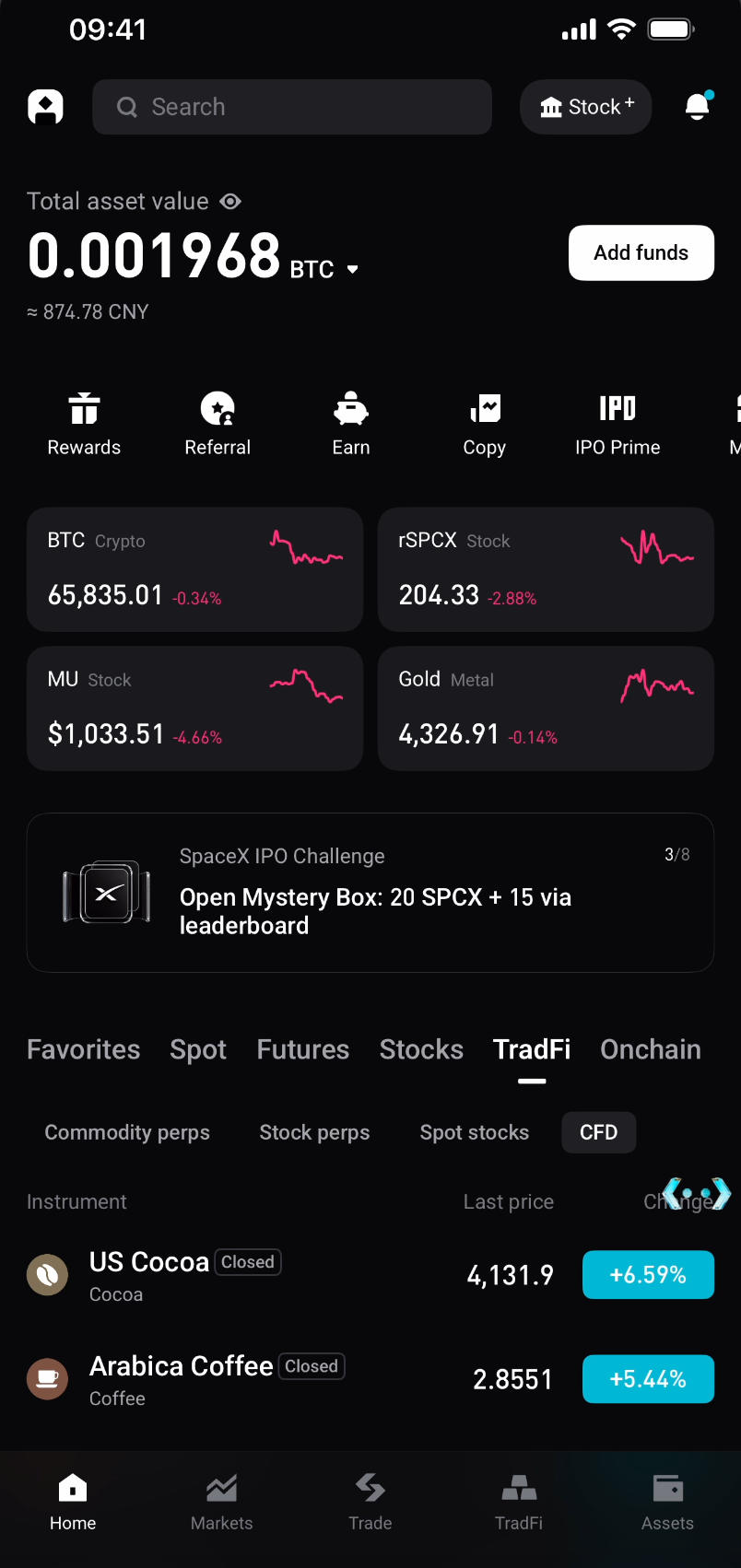
1. Open the Bitget app and tap Stock+ in the upper-right corner of the homepage to enter the U.S. stock trading section.
Step 2: Open a U.S. stock account (first-time users only)
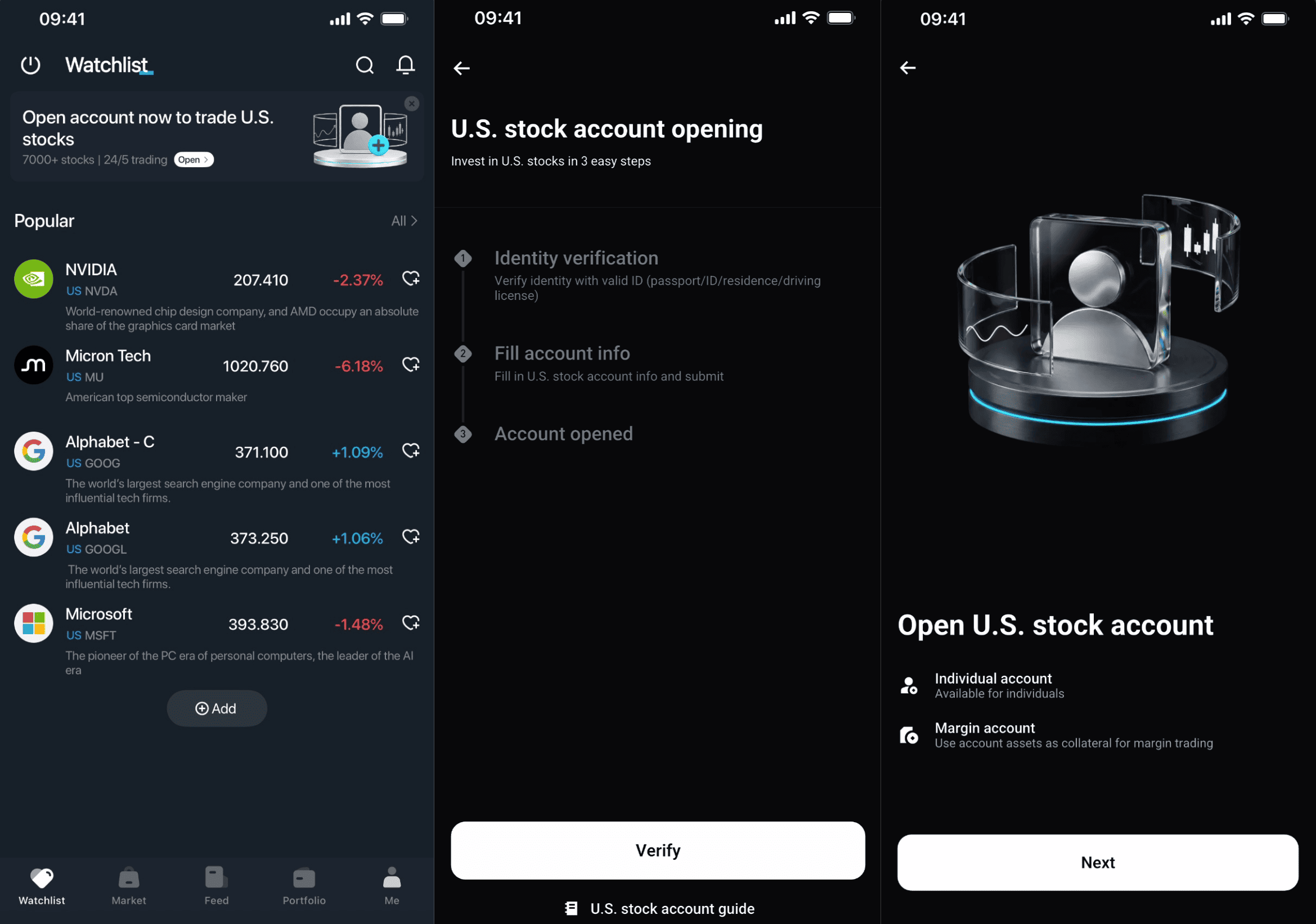
1. Select Open Now.
2. Complete identity verification if you haven't already.
3. Fill in your account information.
Step 3: Deposit funds
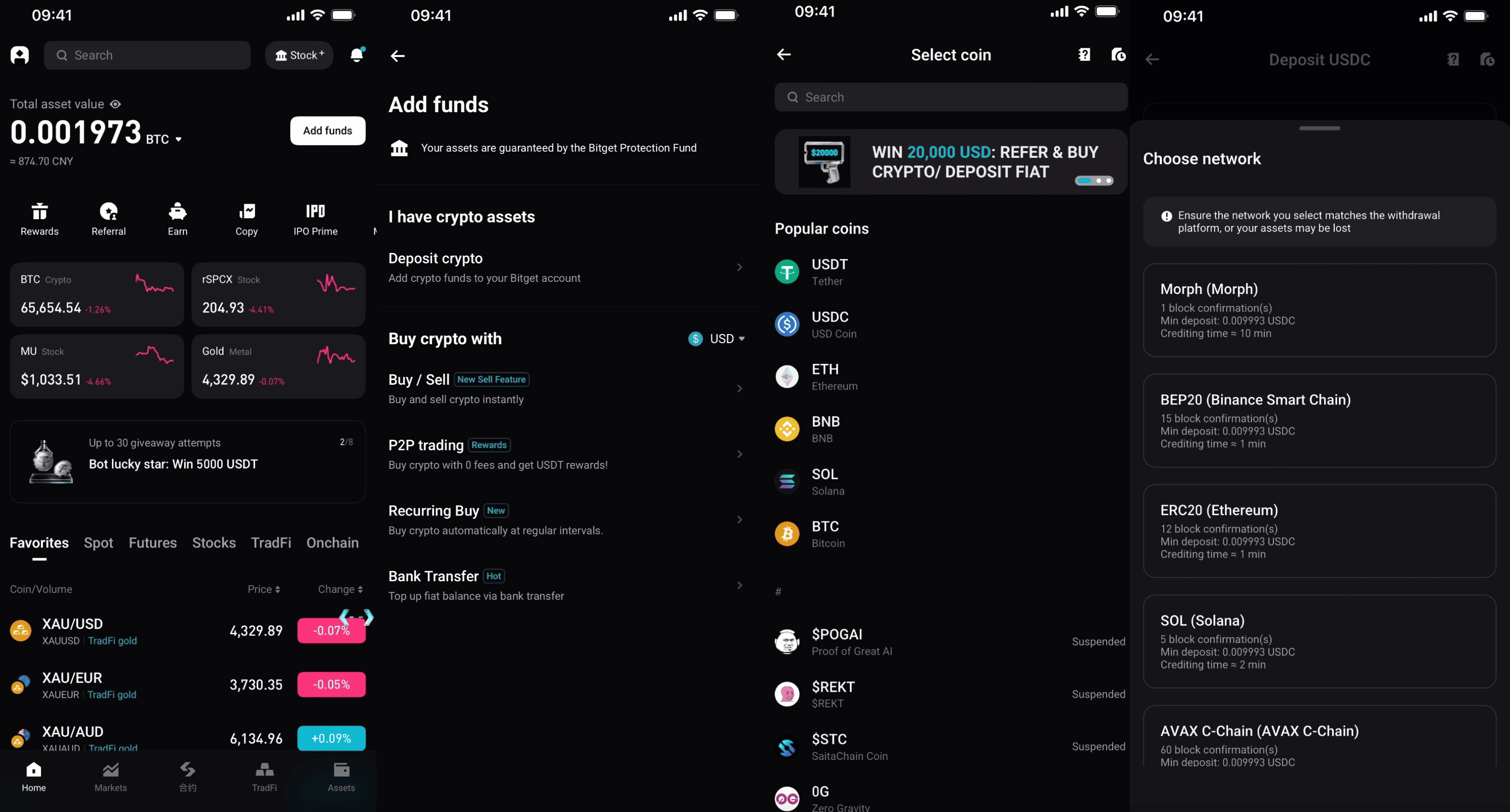
1. Go to the homepage and select Deposit.
2. Select Deposit Crypto.
3. Select USDC.
4. Choose a network and complete the deposit.
Step 4: Transfer funds (USDC to your securities account)
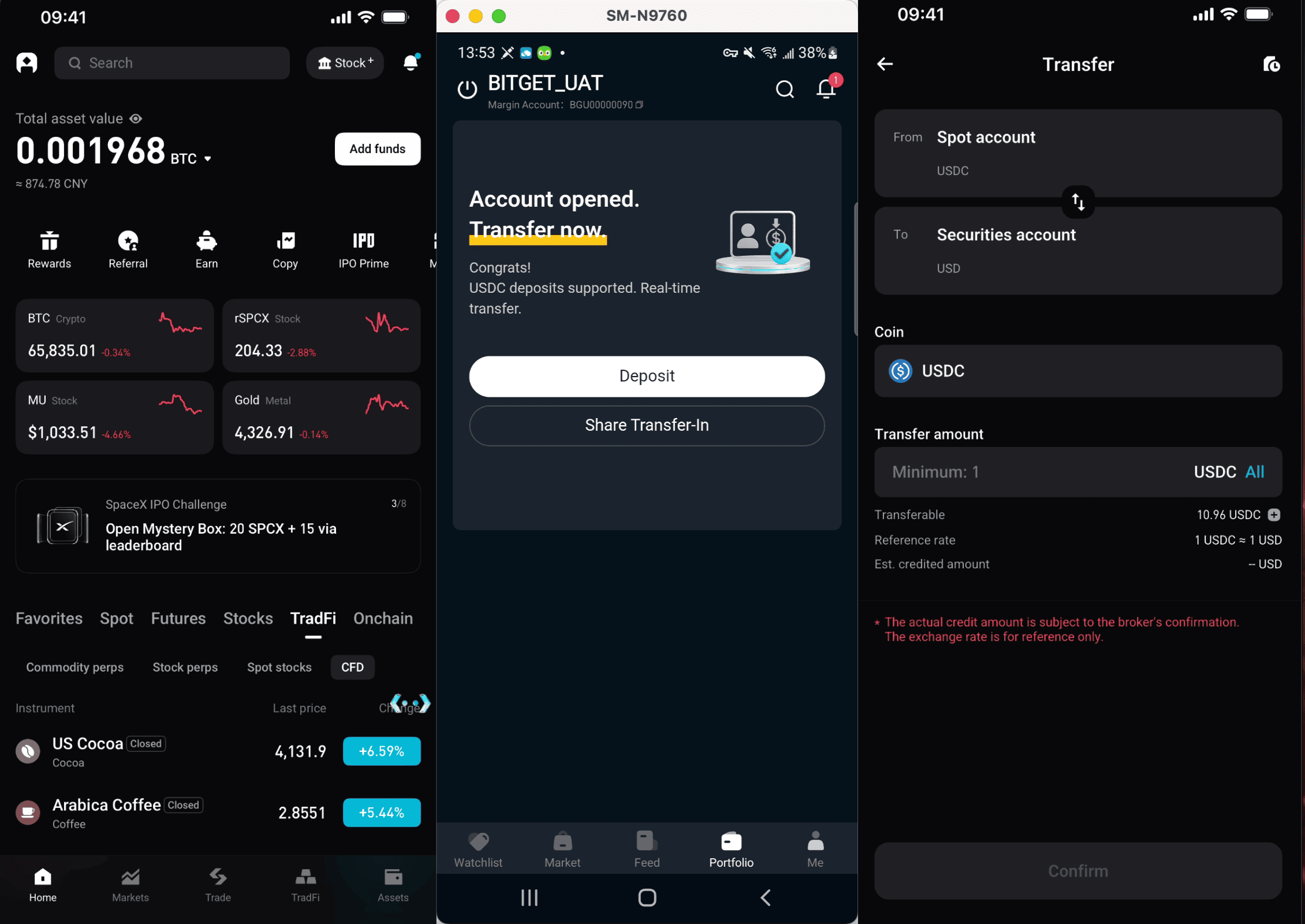
Recommended method (direct transfer):
1. Go to Assets.
2. Select Transfer.
3. Select USDC and enter the amount.
4. Confirm the transfer.
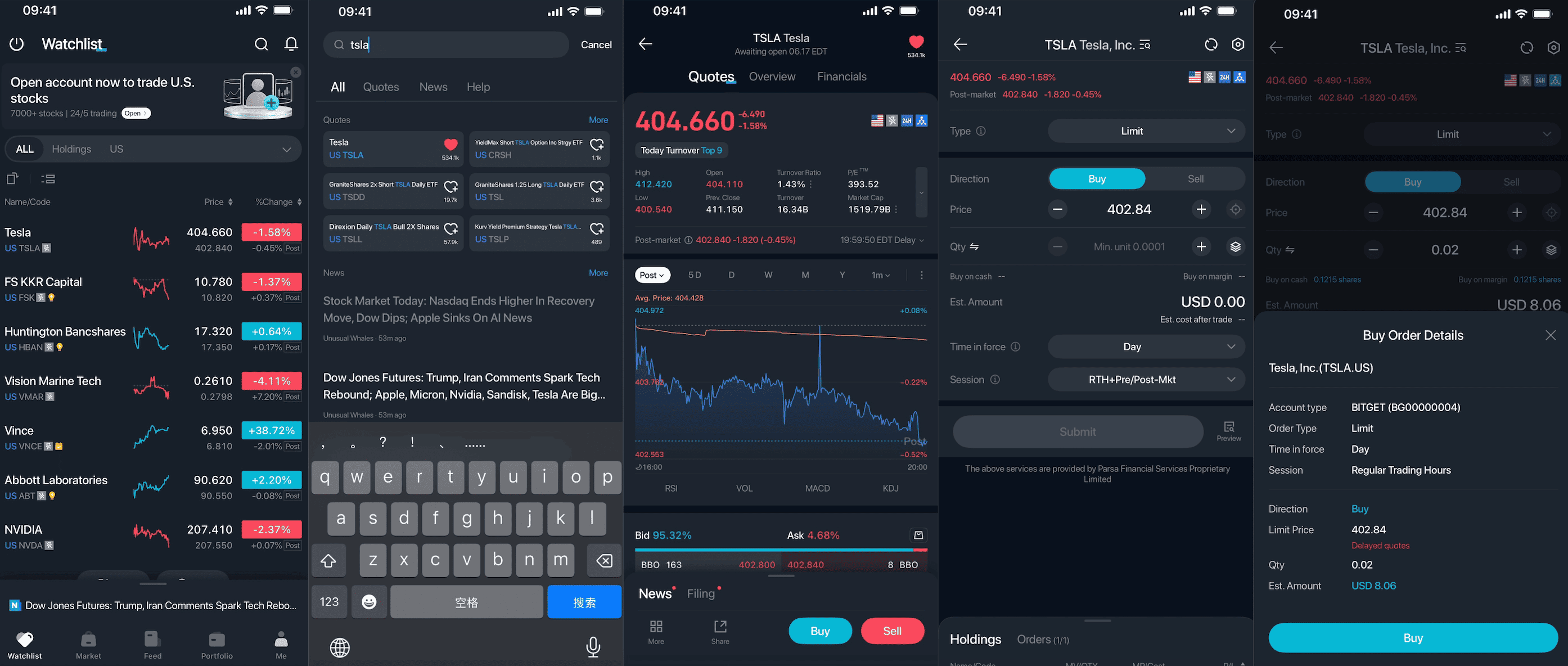
Step 5: Buy and sell U.S. stocks
1. Search for a ticker symbol (e.g., AAPL, NVDA, or TSLA) or browse the stock list.
2. Open the stock details page.
3. Select Buy or Sell.
4. Enter the quantity and price, then confirm your order.
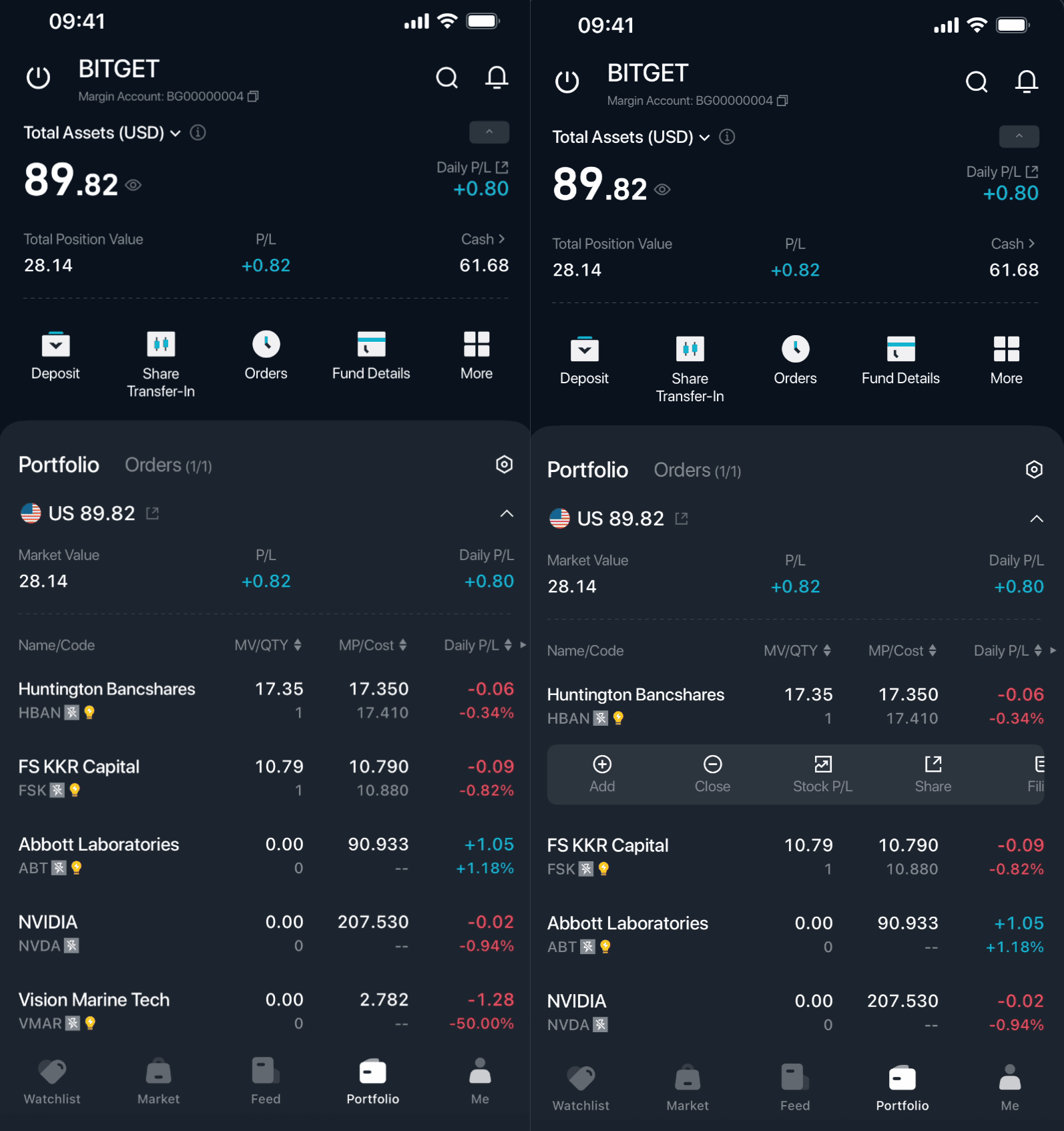
Step 6: View and manage your holdings
1. Go to Assets.
2. View your positions and order history.
3. You can increase, reduce, or close your positions at any time.
Open the Bitget app, tap Stock+ in the upper-right corner, complete account opening and funding, and start your U.S. stock investment journey!
FAQs
1. What is Bitget Stock+?
Bitget Stock+ is a U.S. stock trading service offered by Bitget. In partnership with U.S.-licensed brokers RQD Clearing and Atomic Vaults Securities, orders are routed to Nasdaq, the NYSE, and regulated market makers for execution, providing access to deep market liquidity. Users can buy, sell, and hold real U.S. stocks in the Bitget app while enjoying full shareholder rights, including cash dividends, stock dividends, and voting rights.
2. What's the difference between Bitget Stock+ and rTokens (stock tokens)?
The key difference lies in the underlying assets and ownership rights:
Bitget Stock+: Corresponds to real stocks held in custody by a regulated broker. Users own genuine U.S. stock assets and enjoy full shareholder rights (cash/stock dividends, voting rights, etc.).
rToken: An on-chain token that tracks the price of a U.S. stock and represents a tokenized beneficial interest, backed 1:1 by stocks held in custody by a licensed broker. Ownership is in the form of an on-chain token, not direct shareholding through a traditional brokerage account.
3. Do I need to open a separate account to use Bitget Stock+? What are the requirements?
Yes. You will need to open a securities sub-account to access Bitget Stock+. However, the system will reuse the advanced identity verification information you have already completed on the Bitget platform, so you do not need to resubmit any documents.
All users outside of restricted countries/regions are eligible to open an account.
4. Can I trade U.S. stocks using multiple currencies directly?
USDC and USD two-way conversion is supported for deposits and withdrawals. Other cryptocurrencies or fiat currencies are not supported. The Bitget Stock+ account uses USD as its settlement and pricing currency, and all U.S. stock trades are conducted in USD.
5. Is fiat deposit supported? Is there a minimum deposit requirement?
Yes. Users can convert fiat to USDC via Bitget's Quick Buy, P2P trading, and other fiat on-ramp channels, then transfer to their Bitget Stock+ account. There is no minimum deposit requirement.
6. What are the transaction fees? Is there a minimum transaction amount?
Standard transaction fee starts from 0.1%. A 50% promotional discount applies through August 31, 2026 (subject to the product page for the latest details).
The minimum transaction amount is subject to official rules upon product launch. A reasonable threshold is typically set to ensure a good trading experience.
7. Are there position limits or day trading restrictions?
There are no restrictions. You are free to day trade without any restrictions.
Join Bitget, the world's largest Universal Exchange (UEX)
Share